
Edit Your Network Adapters MAC Address to Bypass Network Restrictions in Windows 10
Press Windows key + X on your keyboard then click Device Manager. Expand Network adapters, right-click your Ethernet or Wireless adapter then click Properties.
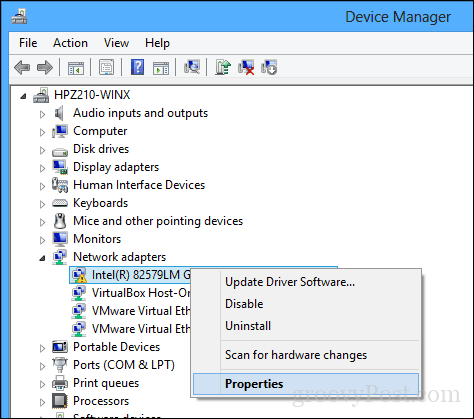
Select the Advanced tab. Within the Property box, scroll down then select Locally Administered Address then select the Value radio box; there you will see your adapters MAC address. To edit the address, click in the value box then clear its contents then enter a new address. A Mac address consists of six pairs of hexadecimal digits. Enter a new set without the hyphens, click OK then restart your computer
Did it work? Let’s find out.
To confirm the change, open Start, type: CMD, right-click CMD then click Run as administrator.
At the command prompt, type: ipconfig/all then hit Enter to check the physical address.
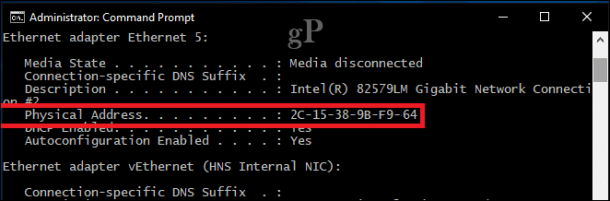
You can also open Start > Settings > Network & Internet, click the connection name then scroll down to view the Physical address (MAC).
Tags- spoof mac address change mac address modify mac address hack computers learn hacking learn ethical hacking learn ethical hacking learn ethical hacking hack computers learn hacking learn hacking

0 Comments